Similarities
In this section, we explore various binary similarity measures that are widely used in classical computing. To refresh the nomenclature used:
1 (Presence in x) |
0 (Absence in x) |
|
|---|---|---|
1 (Presence in y) |
\(a = x\cdot y\) |
\(b = \overline{x}\cdot y\) |
0 (Absence in y) |
\(c = x\cdot \overline{y}\) |
\(d = \overline{x}\cdot \overline{y}\) |
Ample similarity
Ample similarity can be defined as follows:
This metric can have NaN values \(\left(\frac{0}{0}\right)\).
To use the Ample similarity metric to generate a quantum superposition, ensure to set the metric parameter to ‘ample’.
Example: Generation of an Ample quantum superposition.
from qsimov_cloud_client import QsimovCloudClient

# Initialize QsimovCloudClient with your access token
client = QsimovCloudClient("your_access_token")

# Set parameters for the service
client.set_metric("ample")
client.set_state(state_bin='0111010')
client.set_range(["9/4", "inf"])
client.can_have_nan(False)
client.set_ancilla_mode("clean")

# Generate a quantum circuit
circuit_superposition = client.generate_circuit()

# Access the result
print("The resulting circuit in qasm is:", circuit_superposition.get_qasm_code())
Note
Make sure to replace “your_access_token” with your actual Qsimov access token.
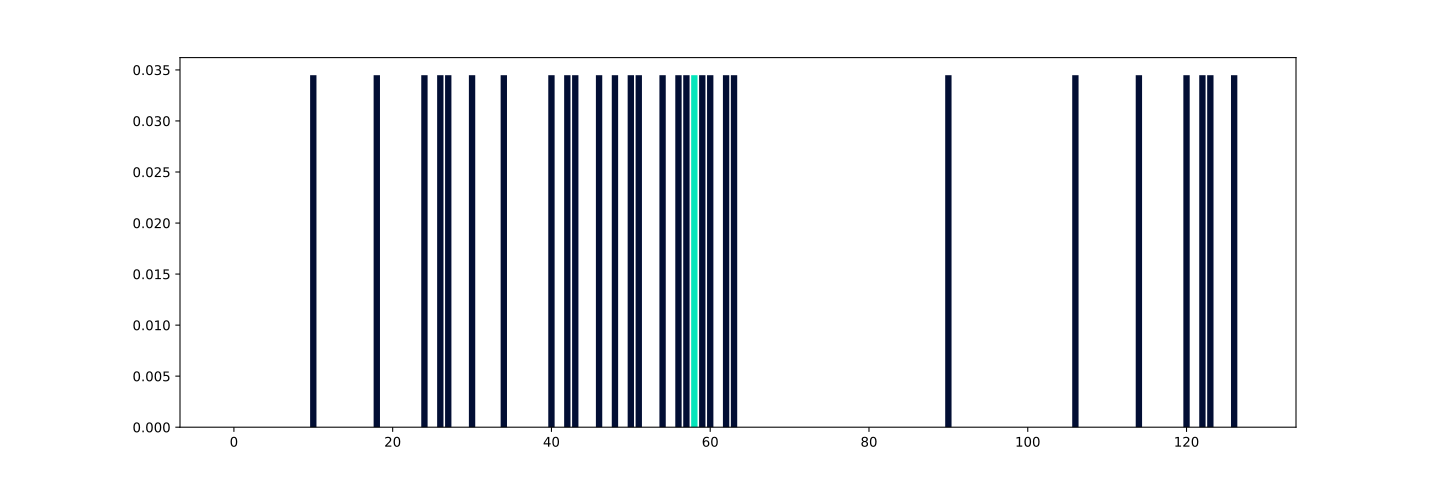
The presented code facilitates the creation of a quantum superposition within the states that have a distance greater than or equal to \(\frac{9}{4}=2.25\) and less than or equal to \(+\infty\) from the reference state \(0111010\ (58)\). If we simulate the generated QASM code and plot the probabilities of the register where the superposition occurs, obtained from the state vector, we will obtain the following result.
Note
The reference state is highlighted in nova mint color.
Cosine similarity
Cosine similarity can be defined as follows:
This metric can have NaN values \(\left(\frac{0}{0}\right)\).
To use the Cosine similarity metric to generate a quantum superposition, ensure to set the metric parameter to ‘cosine’.
Example: Generation of an Cosine quantum superposition.
from qsimov_cloud_client import QsimovCloudClient

# Initialize QsimovCloudClient with your access token
client = QsimovCloudClient("your_access_token")

# Set parameters for the service
client.set_metric("cosine")
client.set_state(state_bin='0111010')
client.set_range(["1/7", "1/4"])
client.can_have_nan(False)
client.set_ancilla_mode("clean")

# Generate a quantum circuit
circuit_superposition = client.generate_circuit()

# Access the result
print("The resulting circuit in qasm is:", circuit_superposition.get_qasm_code())
Note
Make sure to replace “your_access_token” with your actual Qsimov access token.
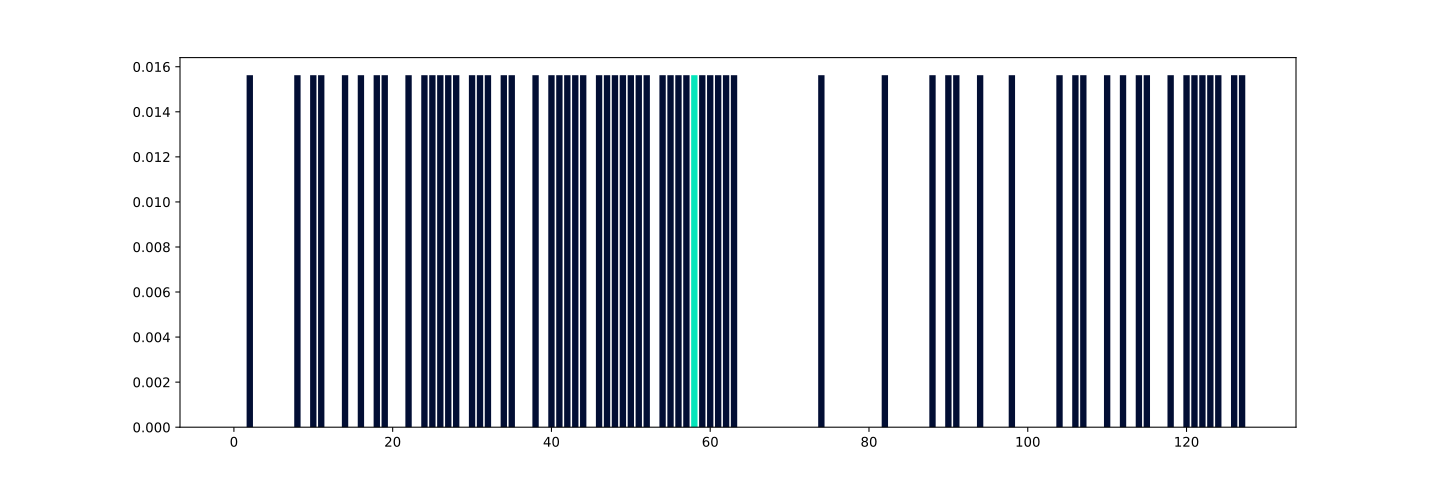
The presented code facilitates the creation of a quantum superposition within the states that have a distance greater than or equal to \(\frac{1}{7}\approx 0.14286\) and less than or equal to \(\frac{1}{4}=0.25\) from the reference state \(0111010\ (58)\). If we simulate the generated QASM code and plot the probabilities of the register where the superposition occurs, obtained from the state vector, we will obtain the following result.
Note
The reference state is highlighted in nova mint color.
Simpson similarity
Simpson similarity can be defined as follows:
This metric can have NaN values \(\left(\frac{0}{0}\right)\).
To use the Simpson similarity metric to generate a quantum superposition, ensure to set the metric parameter to ‘simpson’.
Example: Generation of an Simpson quantum superposition.
from qsimov_cloud_client import QsimovCloudClient

# Initialize QsimovCloudClient with your access token
client = QsimovCloudClient("your_access_token")

# Set parameters for the service
client.set_metric("simpson")
client.set_state(state_bin='0111010')
client.set_range(["2/3", "1"])
client.can_have_nan(False)
client.set_ancilla_mode("clean")

# Generate a quantum circuit
circuit_superposition = client.generate_circuit()

# Access the result
print("The resulting circuit in qasm is:", circuit_superposition.get_qasm_code())
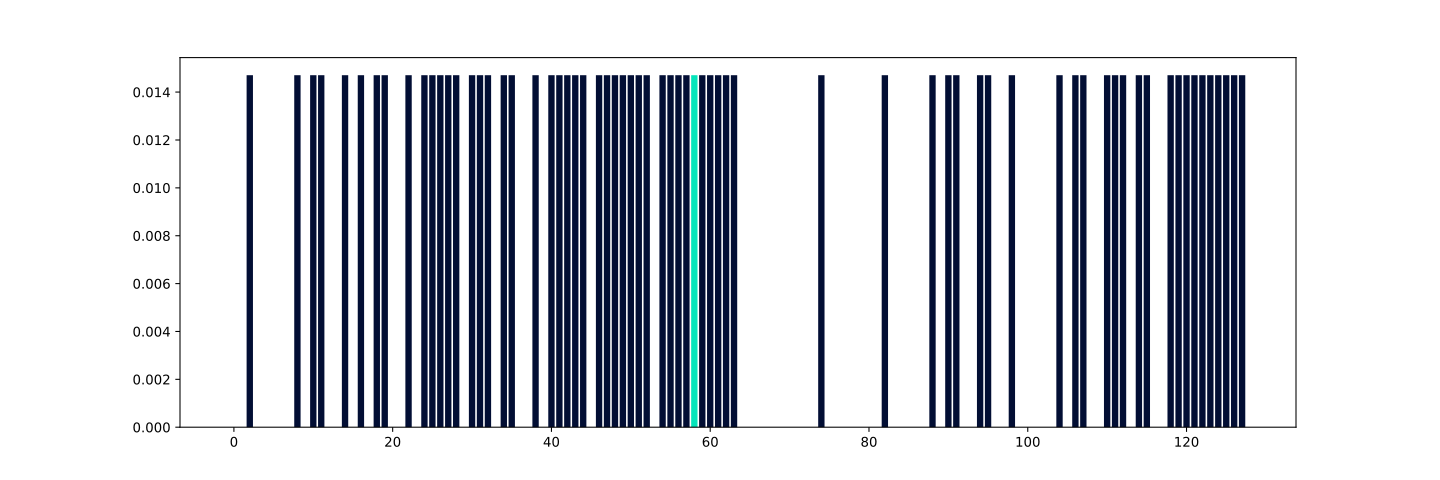
The presented code facilitates the creation of a quantum superposition within the states that have a distance greater than or equal to \(\frac{2}{3}\approx 0.66667\) and less than or equal to \(1\) from the reference state \(0111010\ (58)\). If we simulate the generated QASM code and plot the probabilities of the register where the superposition occurs, obtained from the state vector, we will obtain the following result.
Note
The reference state is highlighted in nova mint color.
Johnson similarity
Johnson similarity can be defined as follows:
This metric can have NaN values \(\left(\frac{0}{0}\right)\).
To use the Johnson similarity metric to generate a quantum superposition, ensure to set the metric parameter to ‘johnson’.
Example: Generation of an Johnson quantum superposition.
from qsimov_cloud_client import QsimovCloudClient

# Initialize QsimovCloudClient with your access token
client = QsimovCloudClient("your_access_token")

# Set parameters for the service
client.set_metric("johnson")
client.set_state(state_bin='0111010')
client.set_range(["27/20", "2"])
client.can_have_nan(False)
client.set_ancilla_mode("clean")

# Generate a quantum circuit
circuit_superposition = client.generate_circuit()

# Access the result
print("The resulting circuit in qasm is:", circuit_superposition.get_qasm_code())
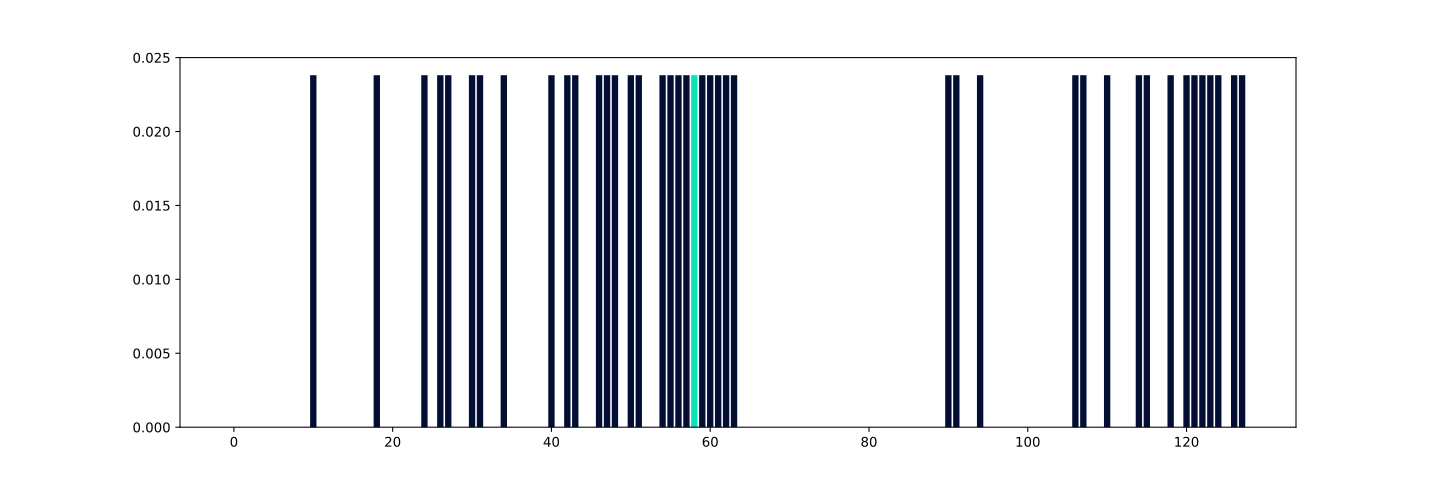
The presented code facilitates the creation of a quantum superposition within the states that have a distance greater than or equal to \(\frac{27}{20}=1.35\) and less than or equal to \(2\) from the reference state \(0111010\ (58)\). If we simulate the generated QASM code and plot the probabilities of the register where the superposition occurs, obtained from the state vector, we will obtain the following result.
Note
The reference state is highlighted in nova mint color.
Pearson I similarity
Pearson I similarity can be defined as follows:
This metric can have NaN values \(\left(\frac{0}{0}\right)\).
To use the Pearson I similarity metric to generate a quantum superposition, ensure to set the metric parameter to ‘pearson_i’.
Example: Generation of an Pearson I quantum superposition.
from qsimov_cloud_client import QsimovCloudClient

# Initialize QsimovCloudClient with your access token
client = QsimovCloudClient("your_access_token")

# Set parameters for the service
client.set_metric("pearson_i")
client.set_state(state_bin='0111010')
client.set_range(["21/10", "7"])
client.can_have_nan(False)
client.set_ancilla_mode("clean")

# Generate a quantum circuit
circuit_superposition = client.generate_circuit()

# Access the result
print("The resulting circuit in qasm is:", circuit_superposition.get_qasm_code())
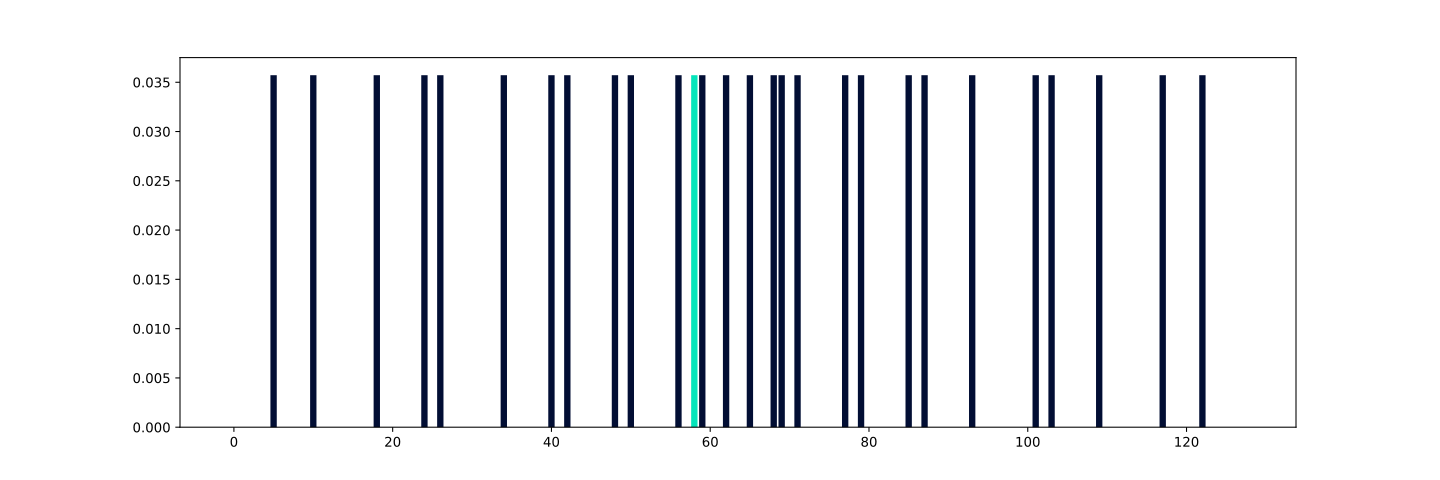
The presented code facilitates the creation of a quantum superposition within the states that have a distance greater than or equal to \(\frac{21}{10}=2.1\) and less than or equal to \(7\) from the reference state \(0111010\ (58)\). If we simulate the generated QASM code and plot the probabilities of the register where the superposition occurs, obtained from the state vector, we will obtain the following result.
Note
The reference state is highlighted in nova mint color.
Jaccard similarity
Jaccard similarity can be defined as follows:
This metric can have NaN values \(\left(\frac{0}{0}\right)\).
To use the Jaccard similarity metric to generate a quantum superposition, ensure to set the metric parameter to ‘jaccard’.
Example: Generation of an Jaccard quantum superposition.
from qsimov_cloud_client import QsimovCloudClient

# Initialize QsimovCloudClient with your access token
client = QsimovCloudClient("your_access_token")

# Set parameters for the service
client.set_metric("jaccard")
client.set_state(state_bin='0111010')
client.set_range(["1/2", "1"])
client.can_have_nan(False)
client.set_ancilla_mode("clean")

# Generate a quantum circuit
circuit_superposition = client.generate_circuit()

# Access the result
print("The resulting circuit in qasm is:", circuit_superposition.get_qasm_code())
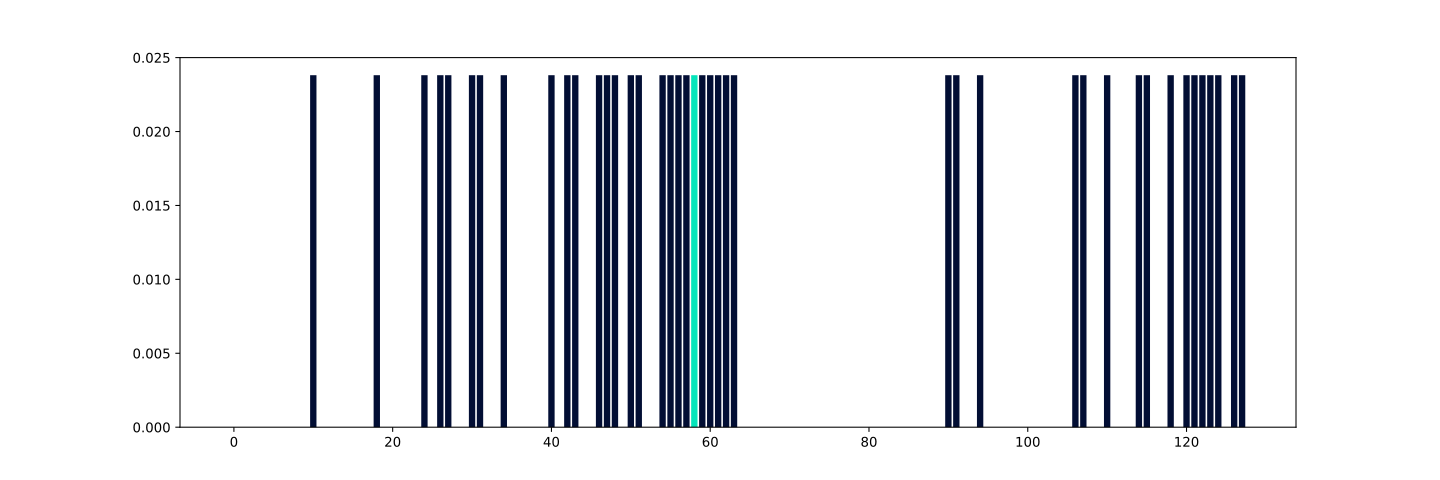
The presented code facilitates the creation of a quantum superposition within the states that have a distance greater than or equal to \(\frac{1}{2}=0.5\) and less than or equal to \(1\) from the reference state \(0111010\ (58)\). If we simulate the generated QASM code and plot the probabilities of the register where the superposition occurs, obtained from the state vector, we will obtain the following result.
Note
The reference state is highlighted in nova mint color.
Dice similarity
Dice similarity can be defined as follows:
This metric can have NaN values \(\left(\frac{0}{0}\right)\).
To use the Dice similarity metric to generate a quantum superposition, ensure to set the metric parameter to ‘dice’.
Example: Generation of an Dice quantum superposition.
from qsimov_cloud_client import QsimovCloudClient

# Initialize QsimovCloudClient with your access token
client = QsimovCloudClient("your_access_token")

# Set parameters for the service
client.set_metric("dice")
client.set_state(state_bin='0111010')
client.set_range(["4/7", "1"])
client.can_have_nan(False)
client.set_ancilla_mode("clean")

# Generate a quantum circuit
circuit_superposition = client.generate_circuit()

# Access the result
print("The resulting circuit in qasm is:", circuit_superposition.get_qasm_code())
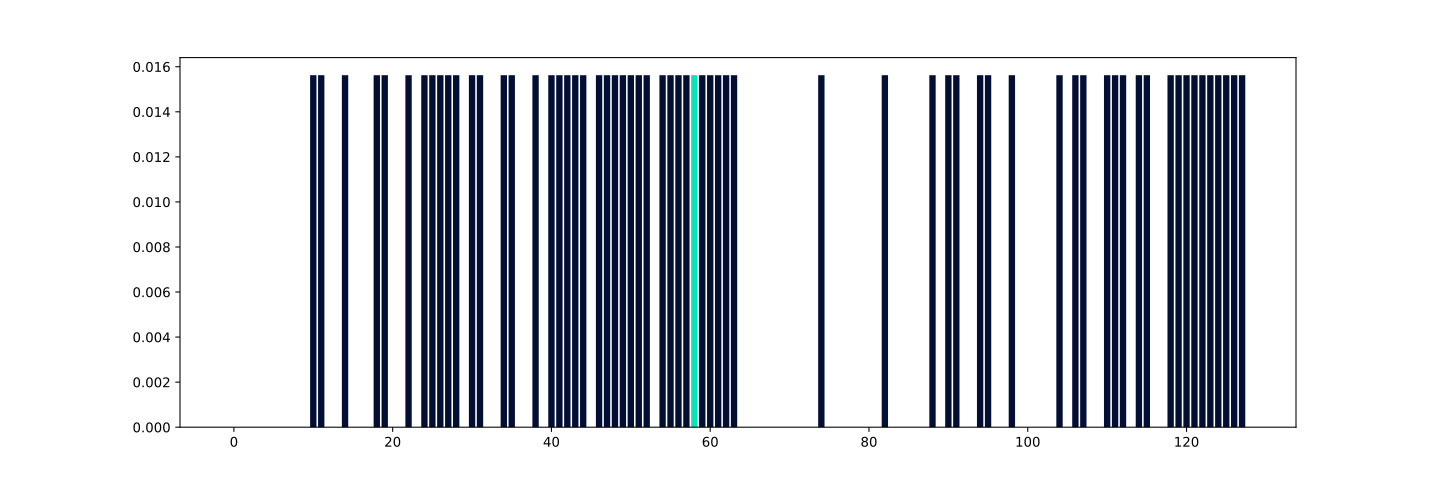
The presented code facilitates the creation of a quantum superposition within the states that have a distance greater than or equal to \(\frac{4}{7}\approx 0.57143\) and less than or equal to \(1\) from the reference state \(0111010\ (58)\). If we simulate the generated QASM code and plot the probabilities of the register where the superposition occurs, obtained from the state vector, we will obtain the following result.
Note
The reference state is highlighted in nova mint color.
Tanimoto similarity
For binary states is same as Jaccard.